




Anki is free, open-source spaced-repetition software first released in 2006. A flashcard in Anki is a note with at least two fields — most commonly a Front and a Back: the front holds a prompt (a word, a question, an image), the back holds the answer. Anki also ships a Cloze note type, which hides a word or phrase inside a sentence for you to recall — popular for exam prep because it tests the answer in context rather than as an isolated pair.
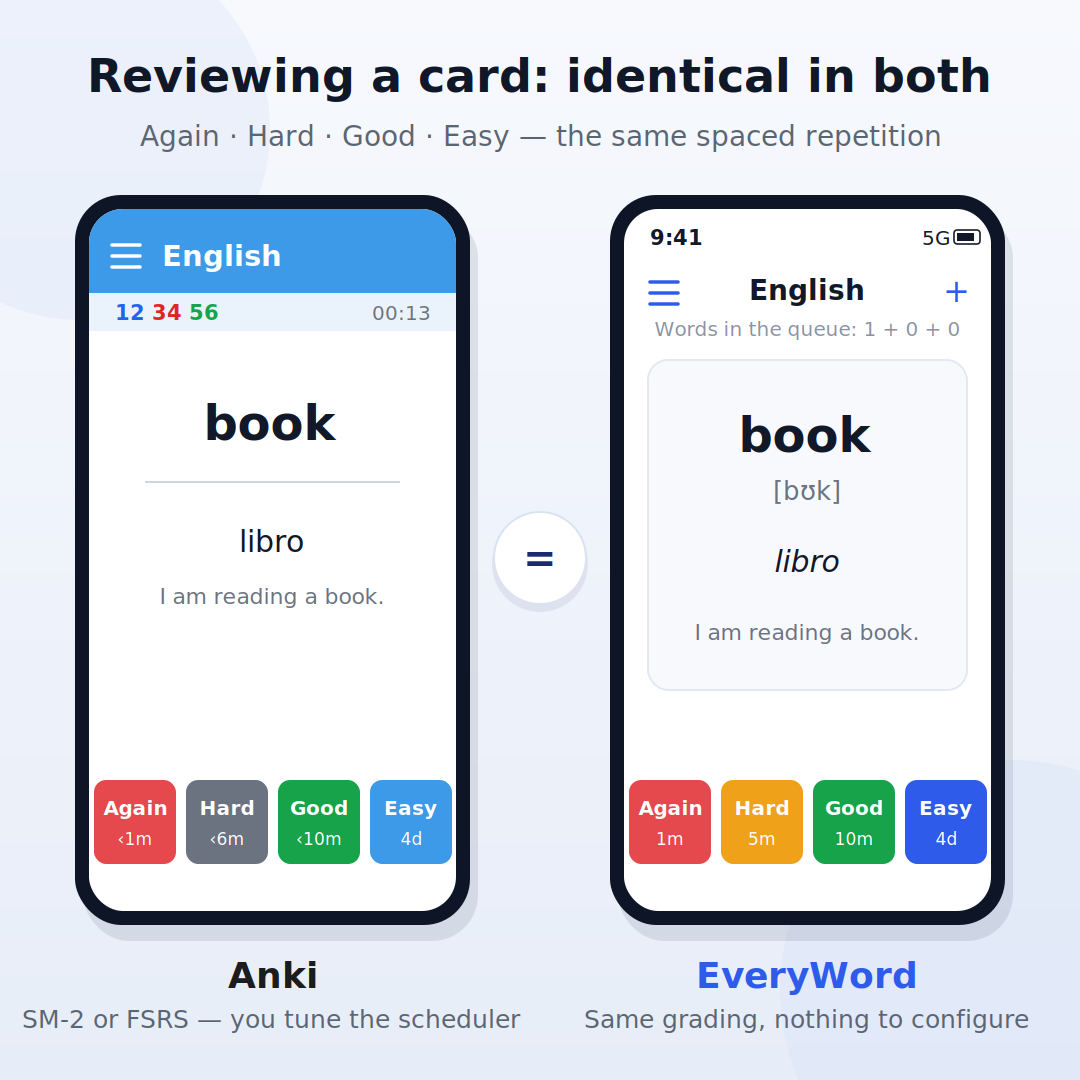
Every card lives in a deck, and every deck runs on a schedule. After each review you grade yourself — Again, Hard, Good, or Easy — and Anki's algorithm sets the next interval from that grade: minutes away if you said Again, weeks or months if you said Easy. Most users now run FSRS (Free Spaced Repetition Scheduler) instead of the older SM-2 formula, since it adapts intervals to your personal memory patterns. That grading loop is the entire mechanic — and it's the part EveryWord keeps unchanged. What EveryWord replaces is everything that happens before the first review: building the card.
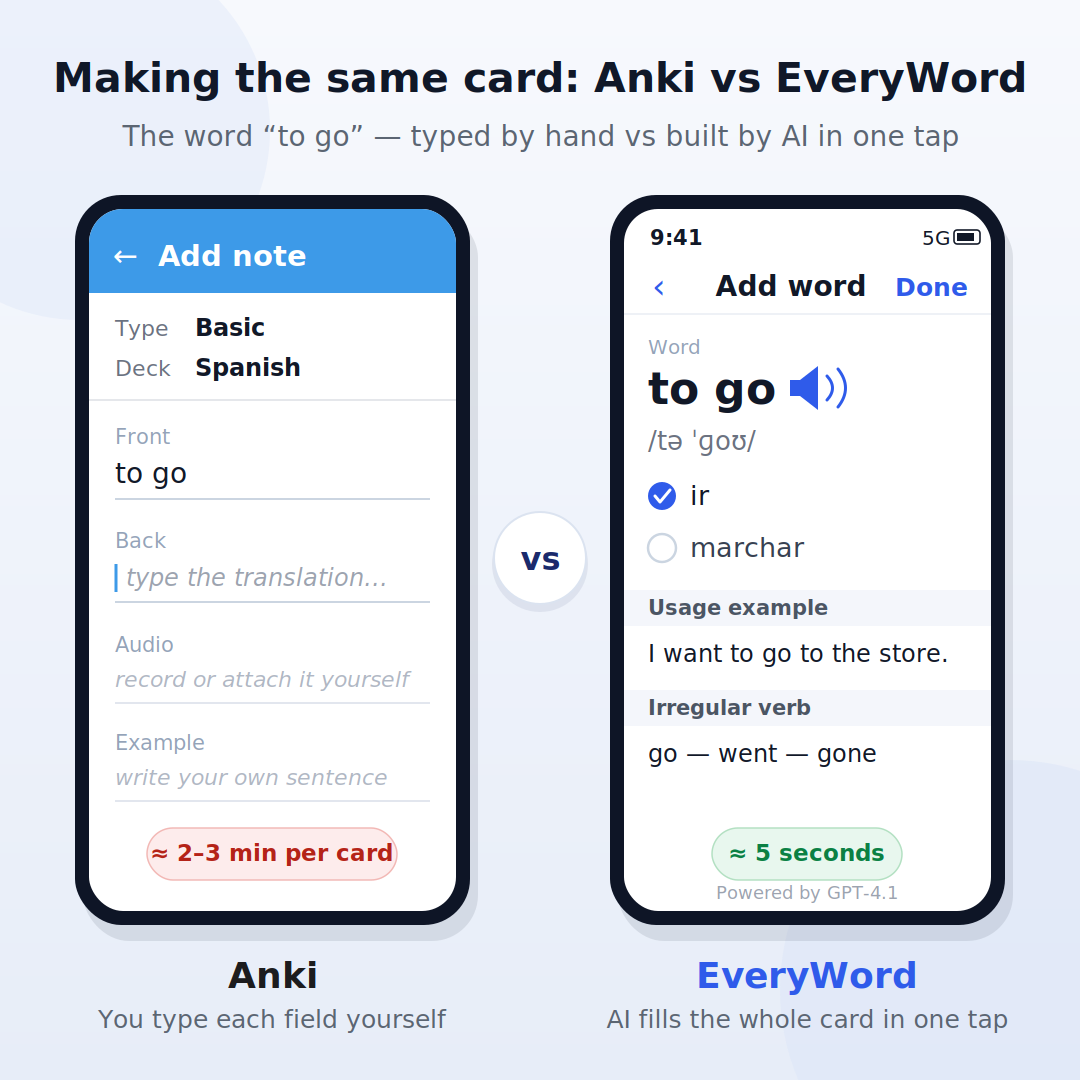
In Anki, a new card is a manual process:
Repeat that for every word. The alternative is importing a shared deck from AnkiWeb's library — thousands exist for languages, medicine, and law — but for anything from your own life (a book you're reading, your notes, a word you just heard) there's no built-in way to auto-fill a translation, pronunciation, or example. That part is typed, pasted, or handled through third-party add-ons.
In EveryWord, the same card takes one step: type the word. AI (powered by GPT-4.1) returns the finished card — one or more translations, the IPA transcription, audio, a natural example sentence, and extras like irregular-verb forms when they apply. You can still edit any field or add your own translations and examples; the AI just does the first pass instead of handing you a blank form.
Card for card, here's who fills in what:
| On the card | Anki | EveryWord |
|---|---|---|
| Translation | You type it | AI fills it in — editable, add your own |
| IPA transcription | You look it up and paste it | Added automatically |
| Pronunciation audio | You record it or set up a TTS add-on | Built in — 80+ languages, US / UK / Australia / India accents |
| Example sentence | You write or copy one | AI writes one in natural context |
| Extras (irregular forms, etc.) | Extra fields you maintain | Added when they apply |
| Custom fields & card layout | Fully customizable note types | Fixed vocabulary-card format |
The last row matters: Anki's blank form is also its power. If you need a card with six custom fields, image occlusion, or LaTeX, Anki will do it and EveryWord won't. For a vocabulary card, though, the fields are the same every time — which is exactly why filling them by hand gets old fast, and why AI can do it reliably.
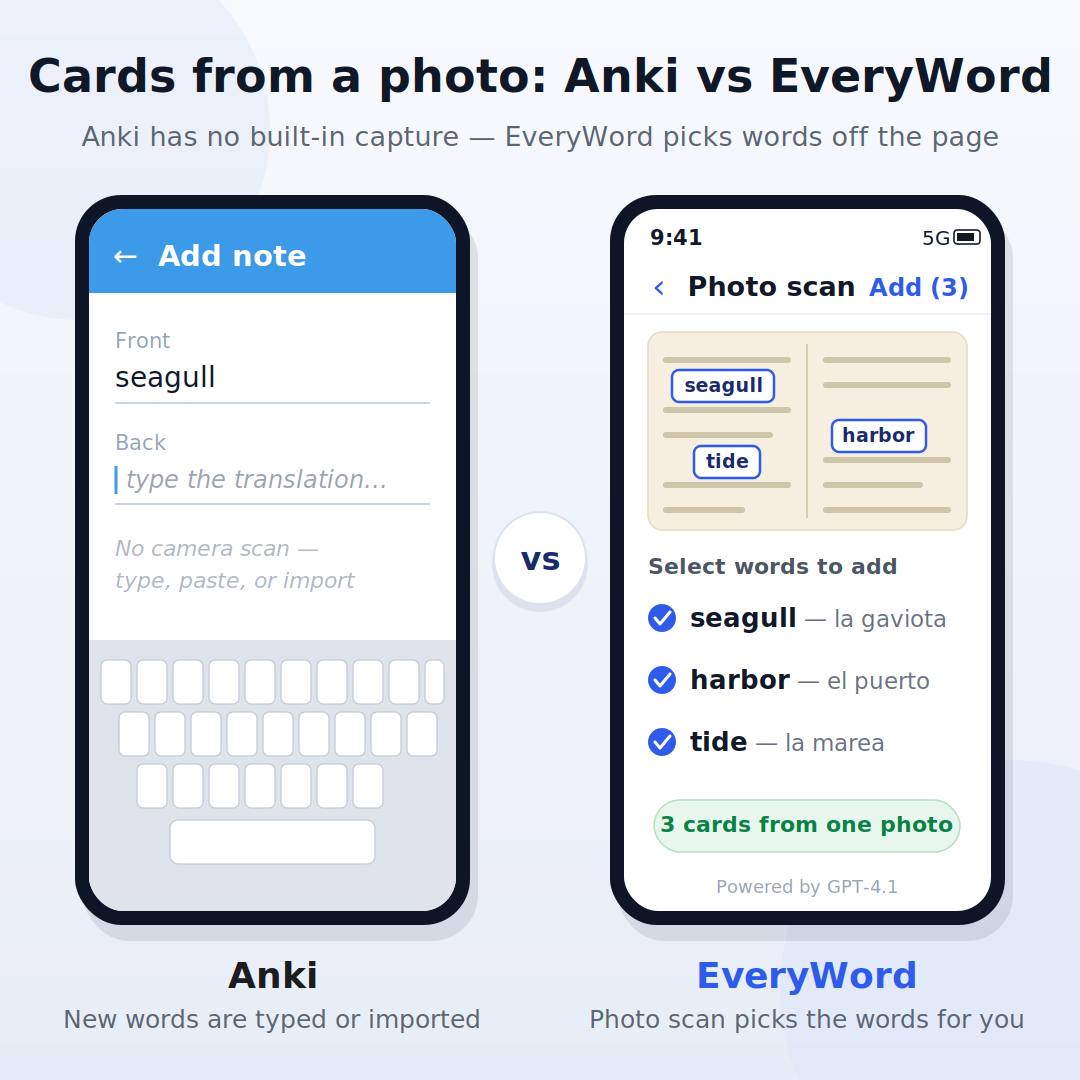
Anki has no built-in capture: new words reach a deck by typing, pasting, or importing. EveryWord adds a second route — photograph a page of a book, your notes, or the objects around you, and it detects the words, translates them, and shows a checklist so you pick which ones to add. You end up studying vocabulary from what you actually encounter, instead of starting from an empty deck or someone else's list.
Once the card exists, the two apps converge. Both show you the prompt, wait for your recall, and take a four-button grade: Again, Hard, Good, or Easy. Both push well-known cards further into the future and bring shaky ones back sooner. The difference is configuration, not method: Anki exposes the scheduler (SM-2 or FSRS, language learning steps, interval caps — all tunable), while EveryWord's engine runs with no settings to manage. If you've reviewed in one app, the other will feel immediately familiar.
An honest card-level comparison has a real column for Anki (and if you are choosing between Anki, Quizlet and other flashcard apps, our guide to the best Quizlet alternatives for language learners compares ten of them):
If you're weighing the two apps against each other — platforms, learning curve, who should pick which — that's a separate question, covered in the full EveryWord vs Anki comparison. This page stays on the cards themselves.
The cards are free to make on almost every platform — with one exception that surprises people:
| Platform | Price |
|---|---|
| Desktop (Windows, Mac, Linux) | Free |
| AnkiWeb (browser, syncs your decks) | Free |
| AnkiDroid (Android) | Free, open-source |
| AnkiMobile (iPhone / iPad) | $24.99, one-time purchase |
Why $24.99 on iOS and nothing everywhere else? Anki's developer has said the fee funds ongoing work on the free versions — the one paid app subsidizes the rest of the open-source project. It's a single purchase, not a subscription. EveryWord takes the other route: free to use on both iOS and Android, with an optional Premium upgrade rather than a required purchase — so reviewing on an iPhone never starts with a paywall.
Keep the review method. Skip the manual card-building.
Free to use on iPhone and Android — make your first AI flashcard in one tap.
Digital flashcards reviewed inside Anki, free spaced-repetition software. Each card has a prompt and an answer (or a cloze sentence), and you grade your recall Again, Hard, Good, or Easy after each review — the app uses that grade to schedule when the card comes back.
Whatever you put there. A Basic note has a Front and Back field; you can add fields for audio, images, example sentences, or hints, and a Cloze note hides part of a sentence instead. Every field is filled in by you — Anki doesn't generate content.
Create a deck, add a note, choose a note type (Basic or Cloze), and type in the fields yourself — the term, the answer, and any audio or example sentence you want. You can also import a shared deck from AnkiWeb instead of building cards from scratch.
Yes. EveryWord builds spaced-repetition cards the same shape as Anki's — word, translation, IPA transcription, audio, example sentence — but AI generates the whole card from one typed word or a photo, in one tap. It's free to use on iPhone and Android.
Anki's developer funds ongoing development of the free desktop, web, and Android versions with that one-time iOS purchase. It's not a subscription, and there's nothing further to buy once you own it.
Spaced repetition plus active recall is a well-supported way to retain dense material, and the Anki community has built huge shared decks — like AnKing — aligned to specific med school courses and board exams, so students can start reviewing instead of building a deck from zero.
No. A robotics company also called Anki — maker of the Cozmo and Vector robots and the Overdrive racing toy — shut down in April 2019 after a late-stage funding deal fell through. It has no connection to the Anki flashcard app, which is a separate open-source project, first released in 2006 and still actively maintained. The two products just share a name.
Information about Anki current as of publication; pricing and features can change — check the app's store listing for current details. Anki, AnkiMobile, AnkiDroid, AnkiWeb, AnKing, and AnkiHub are products of their respective owners; EveryWord is not affiliated with any of them.