The Flashcard Maker That Writes Your Cards for You

Your words. Your pace. AI-powered.

Type a word and EveryWord turns it into a complete flashcard in about a second: translation, phonetic transcription, audio pronunciation, and example sentences — all generated by AI, all editable.

No templates to fill in, no ready-made decks to sit through. You build vocabulary from the words you actually meet in books, classes, and conversations, and spaced repetition makes them stick.

Get EveryWord on Google PlayDownload EveryWord on the App Store

Free on iOS and Android. Free plan plus optional Premium — no required purchase.

Why Advanced Learners Choose EveryWord

Most flashcard apps hand you someone else's deck.

Anki, Quizlet, and Duolingo work well when you follow the lessons built into them — but if you study through a university program, read novels in your target language, or just moved to a new country, the words you need are not in anyone's pre-made list.

EveryWord starts from your words. Add one, and the AI builds the card for you:

  • A translation you can edit or replace with your own
  • IPA transcription and audio pronunciation
  • Sentences that show the word in real context
  • Extras like irregular verb forms, where they matter

Your dictionary grows out of your actual reading and conversations — which is exactly why the cards are worth reviewing.

Comparing tools first? Read our honest breakdown of EveryWord vs Anki or the Anki flashcards guide in the language learning library.

How to Make Flashcards with EveryWord

Add words in a few taps

Met a new word while reading or studying? Type it in.

The AI flashcard generator creates the card instantly, with everything already filled in:

  • Translation (edit it or add your own)
  • Audio pronunciation
  • Phonetic transcription
  • Real-world example sentences

That's the whole workflow: add a word, get a study-ready card, move on with your day. You can create flashcards this way in any of your languages — and unlike an online flashcard maker you open in a browser, the cards stay on your phone, ready whenever you have a spare minute.

Practice Smarter, Not Harder

EveryWord schedules reviews with a spaced repetition algorithm — the same memory science behind Anki, without the setup.

Open the app, try to recall the word, flip the card, and grade yourself: Again, Hard, Good, or Easy. The schedule adapts to how well you remember each word, so easy words stop wasting your time and hard ones come back sooner.

  • Smart spaced repetition system
  • Personalized review scheduling
  • Progress tracking

Scan Instead of Typing

Making flashcards by hand is the slowest part of studying — so skip it.

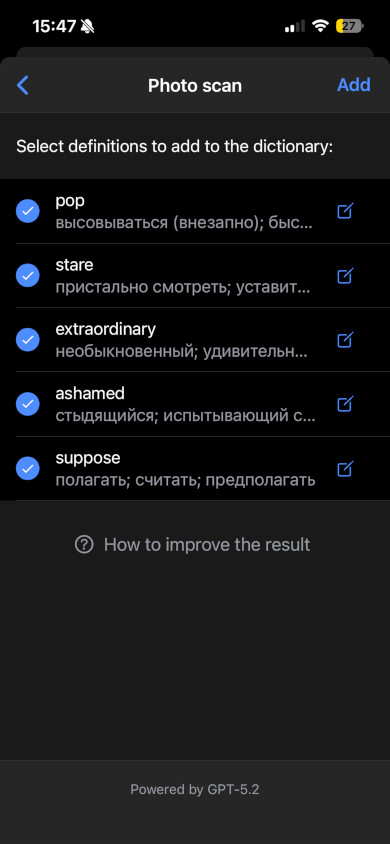
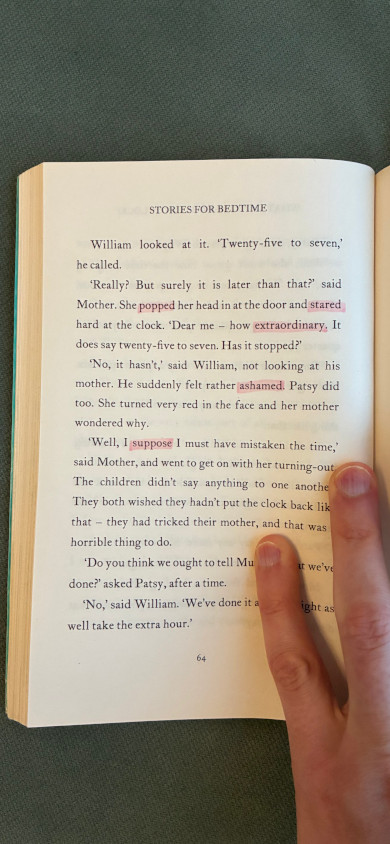
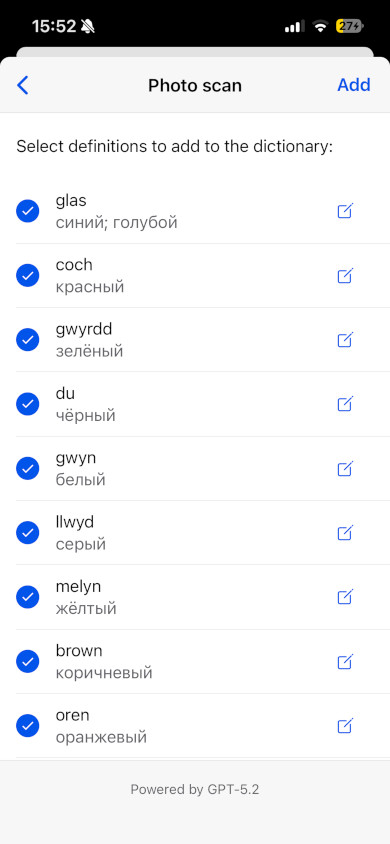
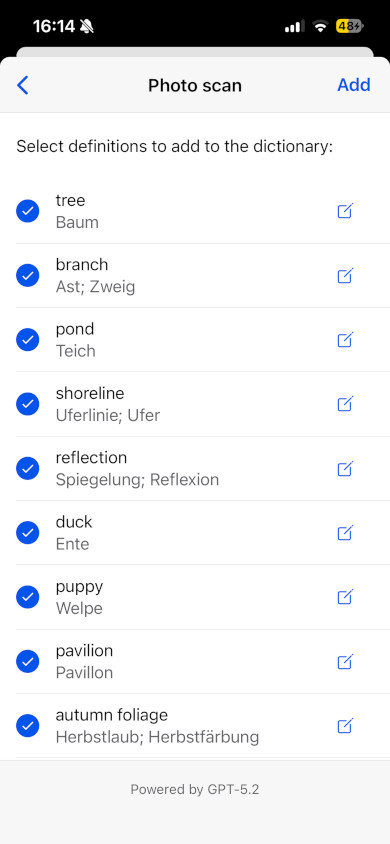
Point your camera at a page and EveryWord's Photo Scan recognizes both text and objects, then shows a checklist of words it found. Tick the ones you want, and the app creates flashcards with pictures of the context you actually saw. It works on:

  • Book pages and articles
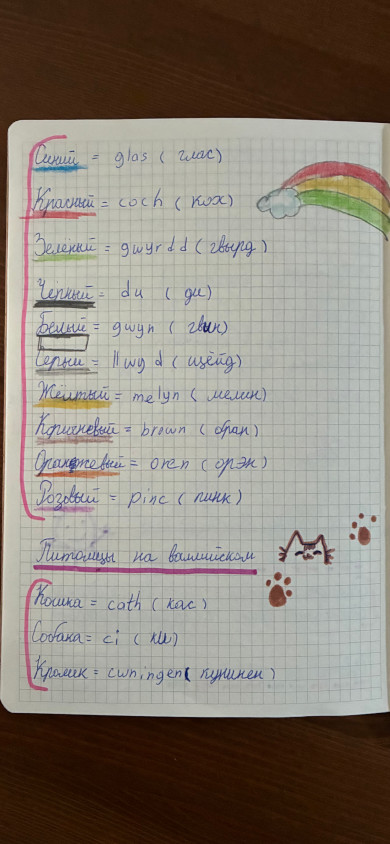
  • Handwritten notes
  • Documents and screenshots
  • Real-world objects around you

Books. Notes. Anything!

Vocabulary flashcards created from a book page A book page in the EveryWord Photo Scan camera BeforeAfter
Vocabulary flashcards created from handwritten notes Handwritten notes in the EveryWord Photo Scan camera BeforeAfter
Vocabulary flashcards created from objects in a photo A real-world scene in the EveryWord Photo Scan camera BeforeAfter

Drag the slider to see what Photo Scan turns into flashcards.

A Free Flashcard Maker for 80+ Languages

EveryWord is a free flashcard maker app for iOS and Android — the free plan covers creating cards, Photo Scan, and spaced repetition, and Premium is optional. The app supports 80+ languages with selectable pronunciation accents (US, UK, Australian, Indian), so your audio matches the English — or Spanish, or Japanese — you're actually learning.

Switching from another flashcard app? EveryWord imports Anki decks, so the vocabulary you've already collected comes with you. Your cards live in personal dictionaries, organized the way you study: by source, by topic, or by language.

Get EveryWord on Google PlayDownload EveryWord on the App Store

What Our Users Say

"Finally an app that doesn't waste my time on basic words I already know. I can focus on exactly what I need."

Maria S.
Learning Portuguese

"The photo scanning feature is amazing. I can generate dozens of flashcards from my textbooks instantly."

David L.
Learning Japanese

"The spaced repetition system works perfectly. My vocabulary retention has improved dramatically."

Sarah K.
Learning German

EveryWord vs Other Flashcard Makers

FeatureEveryWordAnkiQuizletDuolingo
Built-in AI card generation✅ Yes❌ No❌ No❌ No
Create vocabulary flashcards from real text✅ Yes⚠️ Manual⚠️ Limited❌ No
AI translations & pronunciation✅ Yes❌ No⚠️ Partial⚠️ Limited
Contextual example generation✅ Yes❌ No❌ No⚠️ Limited
Photo text recognition✅ Yes❌ No❌ No❌ No
Spaced repetition learning✅ Yes✅ Yes⚠️ Basic⚠️ Basic
Designed for advanced learners✅ Yes⚠️ Technical⚠️ General❌ Beginner focused

Anki remains the strongest choice for desktop power users and non-language subjects — here's our full EveryWord vs Anki comparison.

Oleksii Chornomorchenko, creator of the EveryWord flashcard maker

Why I Built EveryWord

My name is Oleksii, and I created EveryWord after years of learning languages while moving between different countries. Each relocation meant adapting to a new language environment. I tried many flashcards apps and vocabulary tools, but none allowed me to quickly create vocabulary flashcards from the words I actually encountered. Most apps forced users to follow generic lessons.

So I built a simple solution for myself and my family. Add a word. Let AI generate flashcards. Review them with spaced repetition. The results were remarkable. After seeing how effective this method was, I decided to share EveryWord with other learners who want a smarter way to build vocabulary.

— Oleksii, Creator of EveryWord

Flashcard Maker FAQ

What is a flashcard maker?

A flashcard maker — also called a flashcard creator or flash card maker — is a tool that creates study cards with a prompt on one side and the answer on the other. EveryWord is an AI flashcard maker: you type a word or scan it from a photo, and the app generates the whole card — translation, phonetic transcription, audio, and example sentences — then schedules your reviews with spaced repetition.

Is EveryWord free?

Yes. EveryWord is free to use on both iOS and Android. The free plan includes AI card creation, Photo Scan, and spaced repetition; Premium is optional and nothing requires a purchase.

Which is the best flashcard maker?

It depends on what you study. For language vocabulary, EveryWord is built exactly for that: one-tap AI cards with audio and IPA. Anki suits desktop power users and non-language subjects like medicine or law, and Quizlet works well for shared classroom sets if you'd rather make flashcards online in a browser. If you're choosing, our EveryWord vs Anki comparison lays out the differences honestly.

Can ChatGPT make flashcards?

ChatGPT can write card text, but you still have to copy every card into a study app by hand, and you get no audio or review schedule. EveryWord runs GPT-4.1 inside the app, so each word becomes a finished card with translation, IPA, audio, and examples — already in your deck and already scheduled for review.

Can I make flashcards from photos and pictures?

Yes. Photo Scan recognizes both text and objects in a photo — a book page, handwritten notes, or the room around you — and shows a checklist of the words it found. Select the ones you want and the flashcards are created for you.

Can I print flashcards or make them in Word?

You can make flash cards in Word and print them, but paper loses what makes digital flashcards effective: audio pronunciation, and a review schedule that adapts to your memory. EveryWord keeps your cards on your phone, so practice happens wherever you are — no printing, cutting, or sorting.

Does EveryWord use spaced repetition?

Yes. After each card you grade yourself — Again, Hard, Good, or Easy — and the algorithm sets the next review at the moment you're about to forget. That spacing is what moves words into long-term memory.

How many languages does EveryWord support?

80+ languages, with selectable pronunciation accents (US, UK, Australian, and Indian English among them). You can also import your existing Anki decks and keep studying without starting over.


Lääkäripalvelut

Valitkaa teille sopivin vastaanottotapa

Palvelun yhteydessä näkyvät asiakkaan hinta ja Kela-korvaus.

Chat-vastaanotto – nopea vaihtoehto hoidon aloittamiseen ja ohjeiden saamiseen ilman sairauslomatodistusta.

Video, puhelu tai chat – sopii silloin, kun diagnoosin ja sähköisen reseptin lisäksi saatat tarvita myös sairauslomatodistuksen.

Valitse asioinnin syy alta

Oireistasi riippuen sinulle voi sopia eri vastaanottotapa (video, puhelu, chat) tai eri palvelupaketti. Oireen tai palvelun yhteydessä on ilmoitettu palvelun hinta asiakkaalle sekä Kela-korvauksen määrä.