the same flashcards, built for a language instead of a test
EveryWord and Quizlet both start from a flashcard — and that’s where the overlap ends. Quizlet is a study platform for any subject: you type a term and a definition, or borrow a classmate’s set, then drill it until exam day. Its AI turns class notes into study sets and practice tests. EveryWord points AI at a single word instead. Type it or snap it from a photo, and one tap gives you a complete card — translation, pronunciation, phonetics, and an example sentence — scheduled with spaced repetition from day one. Vocabulary stops being a list you cram for Friday’s quiz and becomes words you still know a year later.
Study sets for class, or AI cards for the words you actually meet
Short answer
Quizlet is a study platform for any school subject: you type a term and a definition (or borrow a classmate's set), then drill it with Learn, Test, and Match before an exam. EveryWord does one job — foreign-language vocabulary. Type or photograph a word and AI builds the whole card: translation, IPA transcription, audio, and an example sentence, then schedules it with spaced repetition.
Pick Quizlet for coursework and shared class sets. Pick EveryWord as your Quizlet alternative if you're learning a language and want cards made for you, free on iPhone and Android.
Free on iOS and Android. Free plan plus optional Premium — no required purchase.
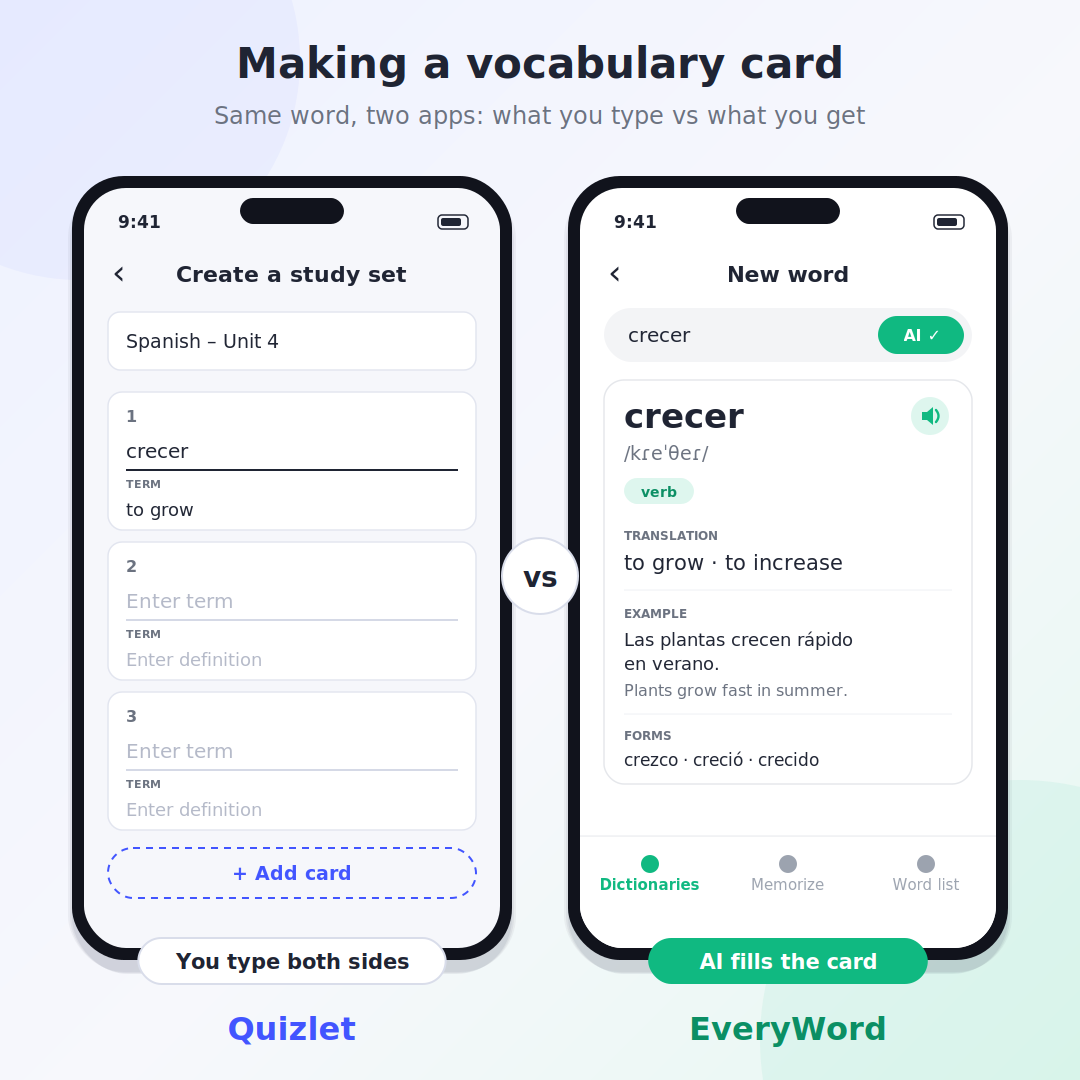
Making a card for the Spanish verb crecer: in Quizlet you type both sides; in EveryWord you type the word and AI fills the rest.
Quizlet earned its place in classrooms. Andrew Sutherland built it in 2005 to get through a high-school French vocabulary quiz, opened it to the public in January 2007, and it has since grown into a study platform for every subject: Quizlet has reported more than 60 million monthly learners and over 500 million user-made study sets, plus Quizlet Live for teachers. Two things push language learners to look for Quizlet alternatives, though. A Quizlet card is a term and a definition — nothing about how the word sounds or how it behaves in a sentence. And the study modes people relied on for years now run on limits unless you subscribe. Here is how the two apps compare, where each one wins, and what Quizlet costs in 2026.
Quick comparison: Quizlet vs EveryWord at a glance
EveryWord
Quizlet
Built for
Foreign-language vocabulary
Any subject — school, college, certifications
Making a card
Type one word — AI (GPT-4.1) adds translation, IPA, audio, example sentence, verb forms
Type term and definition yourself, accept a suggested definition, or copy a public set
What's on the card
Translation(s), IPA transcription, audio, example in context, extras like irregular forms
Term + definition; rich text, custom images, and voice recording on paid plans
Audio & pronunciation
Audio and IPA on every card in 80+ languages; US, UK, Australian, or Indian accent for English
Text-to-speech in 18 languages; no audio for text over 300 characters; no IPA
AI
Builds each word card, in the free plan
Magic Notes and Study Guides turn notes, PDFs, and recorded lectures into flashcards, outlines, and practice tests; metered by plan. The Q-Chat tutor was retired in June 2025
Capture from a photo
Photo Scan reads text and objects, then lets you tick the words to add
Works from uploaded notes and documents rather than picking single words out of a photo
Review method
Spaced repetition for every word: Again / Hard / Good / Easy
Learn, Test, Match, flashcards; Scheduled Review (spaced repetition) added in 2026 for large sets
Free plan
AI cards, Photo Scan, and spaced repetition included
Create and browse sets, flashcards, Match; Learn and practice tests are capped
Paid plan
Optional Premium
Plus $35.99/yr ($7.99 monthly); Plus Unlimited $44.99/yr
Platforms
iOS and Android
Web, iOS, Android
Shared / ready-made sets
No — you build from words you meet (Anki deck import supported)
Yes — a very large public library
Classroom tools
No
Quizlet Live, teacher accounts, classes
Import & export
Imports Anki decks
Paste from Word, Excel, or Google Docs; export your own sets as text (website only)
Offline study
Cards stay on your phone; creating new AI cards needs a connection
Paid plans only
Where EveryWord pulls ahead
One word in, a finished card out
In Quizlet, a new set is a column of empty rows. You type crecer, tab over, type "to grow", and move to the next row. Quizlet can suggest a definition, which helps — but it is still one line of text per word, and you repeat it for every word on the list.
EveryWord asks for the word and nothing else. About a second later you have translations to choose from, the IPA transcription, audio, a sentence that shows the word in use, and the irregular forms if the verb has them (crezco, creció). Everything stays editable, and you can add your own translation when the word means something specific in your textbook.
A card built for a language, not for a definition
Term and definition is the right shape for "mitochondria" or "Treaty of Versailles". Vocabulary needs more. To use crecer in conversation you have to know how it sounds, that the first-person form is irregular, and what a natural sentence with it looks like. Quizlet leaves that to you to type in. EveryWord puts it on every card by default, in 80+ languages, with a choice of US, UK, Australian, or Indian pronunciation for English.
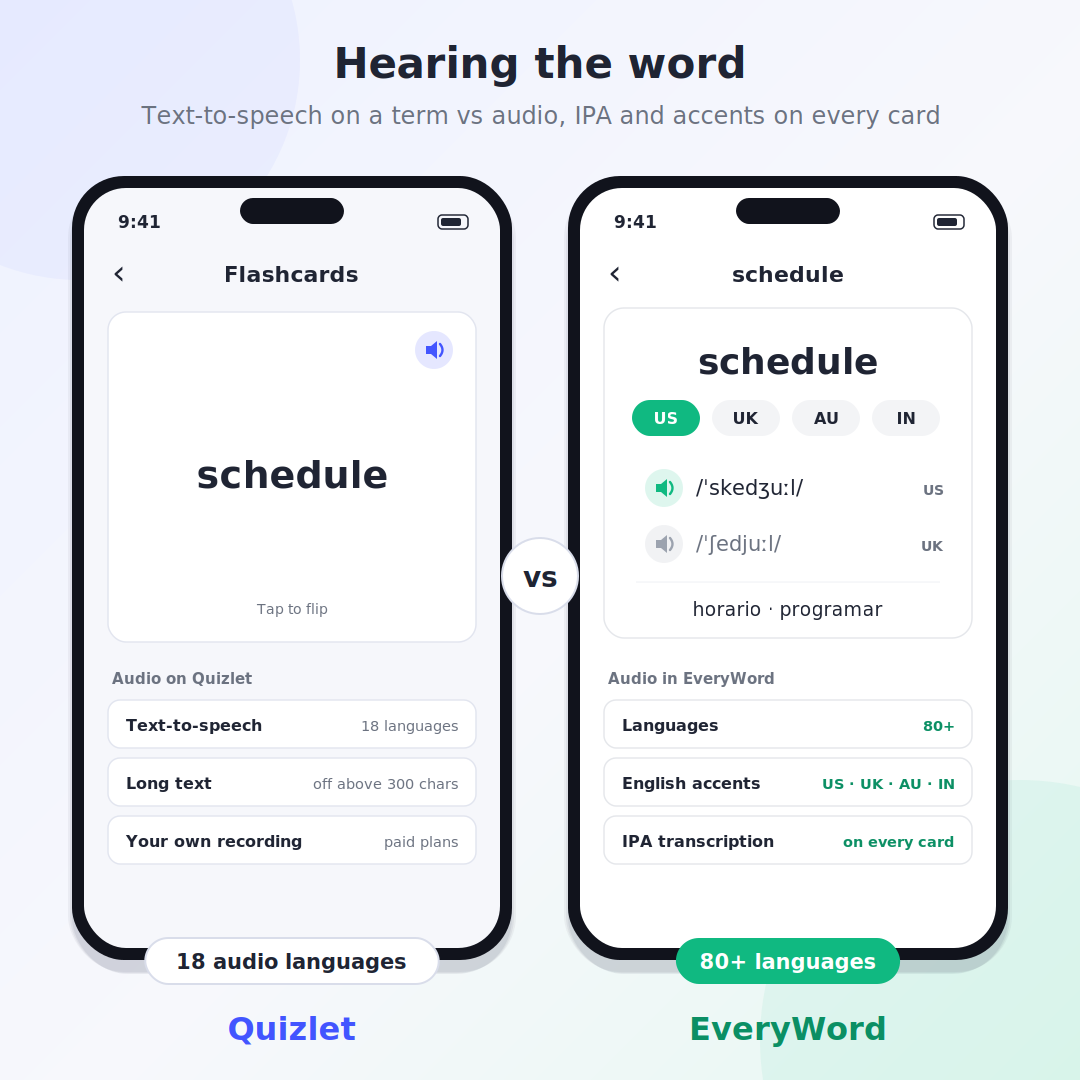
Audio shows the gap most clearly. Quizlet reads terms aloud with text-to-speech in 18 languages — English, Spanish, French, German, Italian, Portuguese, Russian, Japanese, Korean, Mandarin Chinese, Arabic, Dutch, Swedish, Finnish, Greek, Turkish, Romanian, and Polish — and stays silent on any text longer than 300 characters. Learning Czech, Hindi, or Vietnamese? You would have to record every word yourself, and voice recording is a paid feature. Quizlet's own blog suggests teachers record slower audio and example sentences by hand for language classes — the two things EveryWord generates for every card.
The word schedule: Quizlet plays text-to-speech for the term; EveryWord adds IPA and lets you pick the accent you're learning.
Spaced repetition from the first card, in the free plan
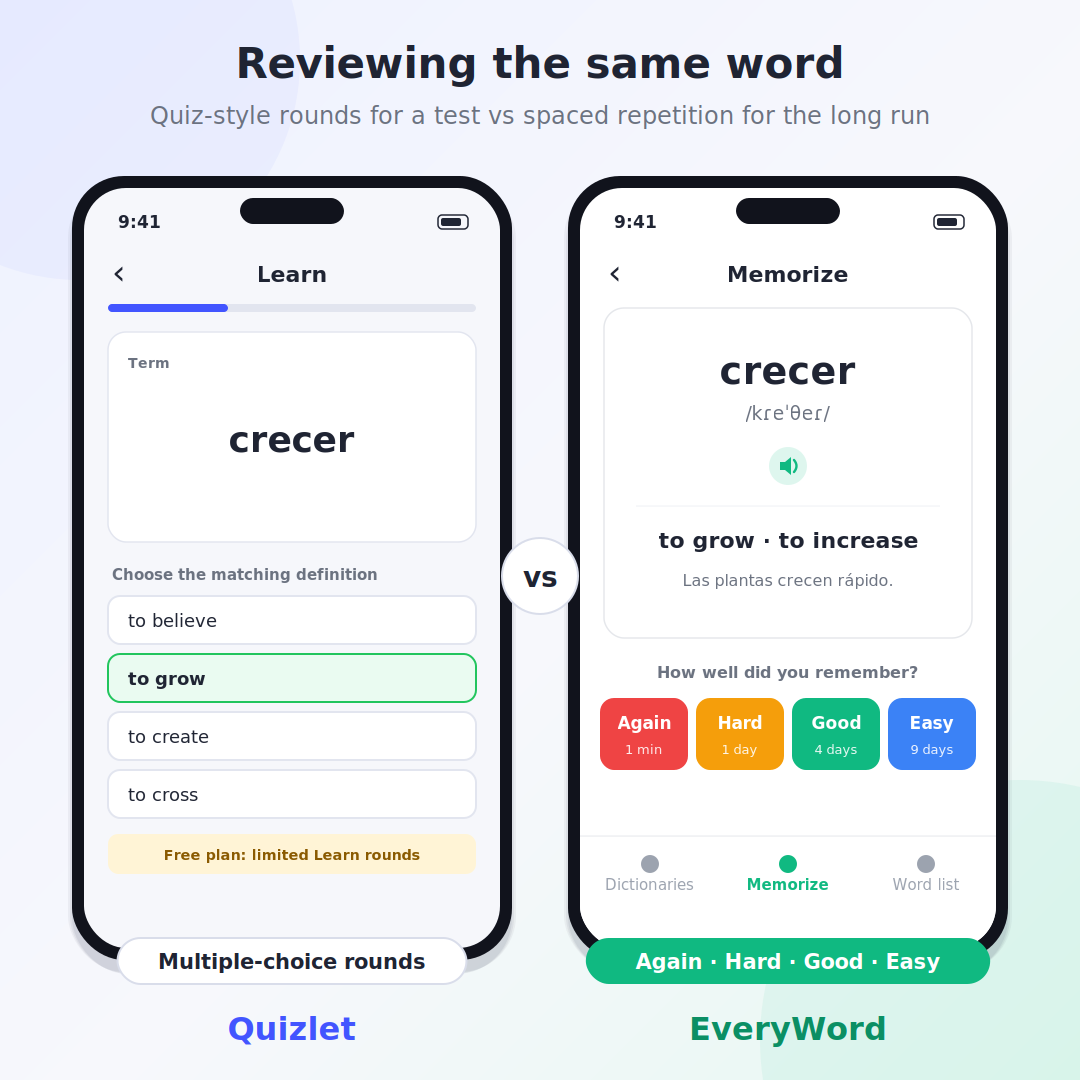
Every EveryWord review is spaced repetition. You see the word, try to recall it, flip the card, and grade yourself Again, Hard, Good, or Easy. The app sets the next review for the point where you would start forgetting. There is no mode to pick and no set-size threshold — a dictionary with 12 words is scheduled the same way as one with 1,200.
Reviewing crecer: Quizlet's Learn mode quizzes you in rounds; EveryWord asks how well you remembered and schedules the next review.
Words from a page, a sign, or the room around you
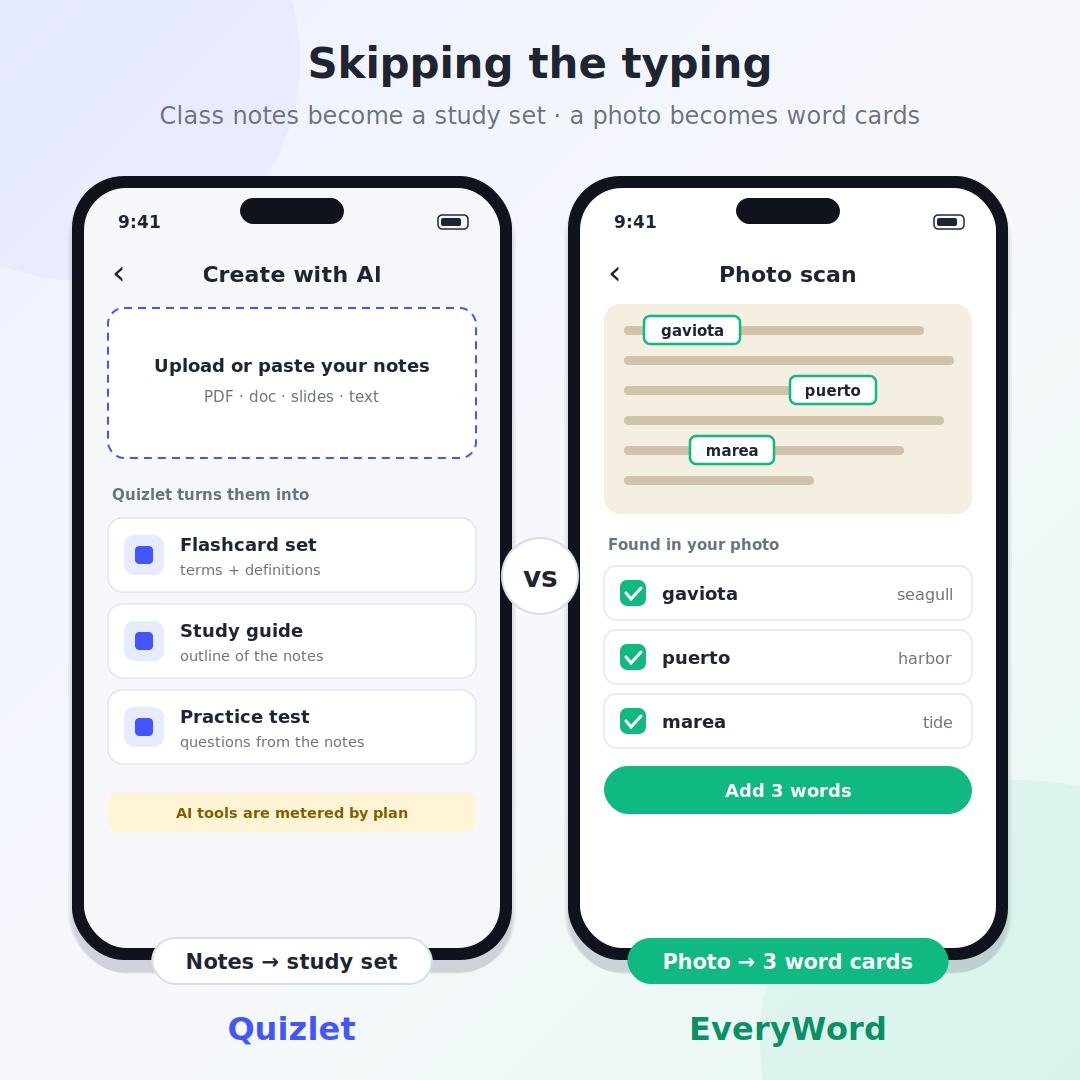
Reading a novel in Spanish and hit three unknown words on one page? Photograph it. Photo Scan recognizes text and objects, lists what it found, and you tick the words worth keeping. They become cards with the same translation, audio, and example as any typed word. Quizlet's AI starts from the other end: you upload lecture notes or a PDF and get a study set, an outline, or a practice test for that class.
Two kinds of AI: Quizlet turns class notes into a study set; EveryWord pulls individual words out of a photo.
Where Quizlet is still the better pick
A comparison is only useful if it is straight with you, so here is where Quizlet wins outright.
You study subjects, not a language. Biology, history, nursing, a real-estate license — Quizlet handles any term-and-definition material. EveryWord only does vocabulary.
Your class already lives there. If your teacher shares sets or runs Quizlet Live, use Quizlet. Nothing in EveryWord replaces a shared class set or a team game.
You want someone else's set. Search a textbook chapter and there is often a ready-made set. EveryWord deliberately has no public library; your dictionary comes from your own reading and lessons.
You're cramming for a test on Friday. Learn, Test, and Match are built for short-term exam prep, and practice tests mimic the real thing. Spaced repetition pays off over weeks, not overnight.
You study at a computer. Quizlet runs in any browser. EveryWord is a phone app for iOS and Android.
Is Quizlet free?
Partly. A free Quizlet account lets you create study sets, browse public ones, flip flashcards, and play Match. The modes most students come for — Learn and practice tests — are capped on the free plan, and the app shows ads. Removing the caps takes a subscription, which is why "Quizlet is not free anymore" has become a common complaint since the limits arrived.
How much is Quizlet Plus?
Plan
US price
What you get
Quizlet Free
$0
Create and browse sets, flashcards, Match, Quizlet Live; limited Learn rounds and practice tests; ads
Quizlet Plus
$35.99 per year (about $2.99 a month), or $7.99 month to month
No ads, offline study, more Learn rounds, practice tests, and textbook solutions — still with monthly allowances
Quizlet Plus Unlimited
$44.99 per year (about $3.74 a month)
Same tools with the monthly caps removed
EveryWord
$0, optional Premium
AI card creation, Photo Scan, and spaced repetition in the free plan, on both iOS and Android
Quizlet prices are US list prices checked in September 2026; they differ by country and are usually higher as an in-app purchase. The 7-day trial applies to annual plans only. Check Quizlet's upgrade page before you subscribe.
Does Quizlet have spaced repetition?
Yes, as of 2026. Quizlet retired its old Long-Term Learning mode years ago, then brought spaced repetition back in February 2026 as Scheduled Review, driven by a Memory Score for each term. You rate a card Repeat, Hard, Okay, or Easy and Quizlet picks the next review date. According to Quizlet's feature page, it switches on automatically for flashcard sets with 100 or more terms.
Learn mode is a different thing. It adapts inside a study session — missed terms come back sooner — but it is designed to get you ready for a deadline, not to hold a word in memory for a year. In EveryWord there is only one review mode and it is spaced repetition, applied to every word from the first card, whatever the size of your dictionary.
Does Quizlet have AI?
It does, and it is aimed at coursework. Magic Notes, launched in August 2023, turns uploaded or pasted class notes into flashcards, outlines, and practice tests; Study Guides do the same for longer material. In February 2026 Quizlet bought Coconote, an app that turns lecture recordings into study materials, and in March 2026 it added a ChatGPT integration for generating sets from notes and conversations. How often you can use these tools depends on your plan. One thing to know if you're reading older reviews: Q-Chat, Quizlet's AI tutor, was shut down in June 2025, even though many 2026 round-ups still list it as a headline feature.
EveryWord's AI has a narrower brief: take one word and produce a complete, accurate vocabulary card. If your material is a 40-page lecture PDF, Quizlet's approach fits. If your material is a word you just heard on the tram, EveryWord's does.
Is Quizlet good for language learning?
For a vocabulary quiz in Spanish 101, yes — your teacher's list is probably already on Quizlet, and Learn mode will get you through Friday. For building a working vocabulary over months, the gaps show: audio in 18 languages only, no IPA, no example sentences unless you type them, no word forms, and scheduling that only turns into spaced repetition on large sets. Language reviewers tend to land in the same place — SmarterLanguage compared Quizlet to Microsoft Paint next to Anki's Photoshop: simple and pleasant, but thin on long-term review. That is the gap EveryWord was built for — learners who pick up words from books, courses, and daily life and want to keep them.
Quizlet vs Anki vs EveryWord
People who outgrow Quizlet usually look at Anki next. Anki is free on desktop and Android, open-source, and has the strongest scheduling (FSRS) of any flashcard app — but every card is built by hand and the iPhone app costs $24.99. EveryWord sits between the two: Anki's review method, without the card-building. We cover that pairing in EveryWord vs Anki, and compare the cards themselves in the Anki flashcards guide.
you want translation, IPA, audio, and examples on every card without typing them
you collect words from books, signs, and notes
you want spaced repetition in a free app on your phone
Plenty of students keep both: Quizlet for the biology midterm, EveryWord for the language they're actually trying to speak.
Switching from Quizlet to EveryWord
You don't have to move everything. Start with the words you're learning this week and add them as you meet them. For a Quizlet vocabulary set you created, Quizlet's website lets you pull the words out: open the set, choose Export, then Copy text (it isn't available in the mobile app, and sets copied from other users can't be exported). From there, type the words that matter into EveryWord, or put the list on a screen or a printout, point Photo Scan at it, and tick the ones you still don't know — each becomes a full card instead of a bare term-and-definition pair. Coming from Anki as well? EveryWord imports Anki decks directly.
Build your first ten cards in a minute
Type a word or scan a page. EveryWord writes the card and schedules the review.
Free on iOS and Android. Free plan plus optional Premium.
Frequently asked questions
Is EveryWord a good Quizlet alternative?
For language learners, yes. EveryWord replaces typing terms and definitions with AI-built vocabulary cards — translation, IPA, audio, and an example sentence — and reviews them with spaced repetition. For school subjects, shared class sets, and practice tests, Quizlet remains the better tool.
What are apps like Quizlet?
The apps most often compared with Quizlet are Knowt, Anki, Brainscape, RemNote, Memrise, and EveryWord. Knowt is the closest like-for-like replacement for class study sets, Anki suits power users who want full control over spaced repetition, and EveryWord is the pick for foreign-language vocabulary.
Is there a free Quizlet alternative for learning vocabulary?
Yes. EveryWord is free to use on iPhone and Android, and the free plan includes AI card creation, Photo Scan, and spaced repetition. Premium is optional, and nothing requires a purchase.
Why is Quizlet not free anymore?
Quizlet still has a free account, but it moved to a freemium model: Learn rounds and practice tests are capped for free users, and unlimited use requires Quizlet Plus Unlimited ($44.99 per year in the US). Creating sets, browsing public sets, flashcards, and Match remain free.
Can EveryWord make flashcards automatically?
Yes. Type a word or photograph it and EveryWord's AI, powered by GPT-4.1, generates the full card: one or more translations, IPA transcription, audio, an example sentence, and extras such as irregular verb forms. You can edit any field or add your own translation.
Which is better for exams, Quizlet or EveryWord?
Quizlet. Its Learn, Test, and Match modes and practice tests are designed for short-term exam prep in any subject. EveryWord is designed for remembering vocabulary over months, which is a different goal from passing a test this week.
Can I use Quizlet and EveryWord together?
Yes, and many students do. Keep Quizlet for coursework and sets your teacher shares, and use EveryWord for the language you're learning, where AI-built cards with audio and spaced repetition do the work that a term-and-definition set can't.
Is Quizlet's Q-Chat still available?
No. Quizlet confirmed that Q-Chat, its ChatGPT-based AI tutor launched in March 2023, is no longer available as of June 2025. Quizlet's current AI tools are Magic Notes and Study Guides, which build flashcards, outlines, and practice tests from your notes.
Comparison based on publicly available information about Quizlet as of September 2026. Quizlet, Quizlet Plus, and Quizlet Live are products of Quizlet, Inc.; EveryWord is not affiliated with Quizlet. Anki and AnkiMobile belong to their respective owners. Pricing and features change — check each app's website or store listing for current details.
Lääkäripalvelut
Valitkaa teille sopivin vastaanottotapa
Palvelun yhteydessä näkyvät asiakkaan hinta ja Kela-korvaus.
Oireistasi riippuen sinulle voi sopia eri vastaanottotapa (video, puhelu, chat) tai eri palvelupaketti. Oireen tai palvelun yhteydessä on ilmoitettu palvelun hinta asiakkaalle sekä Kela-korvauksen määrä.